
Position
On this page
Position shows where your brand appears in an AI answer when the answer mentions it. In the Track My Visibility application, position is reported as your average position across all AI answers that name your brand.
Most AI answers list a few brands. People pay more attention to the first ones, and some readers never get past the first recommendation, so being named first matters as much as being named at all.
How position is calculated#
When an AI model mentions your brand, Track My Visibility records where you appear among the brands in that answer. If you're the second brand named, your position for that answer is 2.
Average position is the average across all answers that mention you. A lower number is better, and a position of 1.0 means AI models named you first every time.
How to read position#
Always read position together with visibility, because each metric changes the meaning of the other:
- Position of 1.0 with 3% visibility: AI models name you first, but only in a few answers.
- High visibility with a position of 4 or 5: AI models know your brand, but they recommend other brands first.
The combination tells you what to work on:
- Low visibility: work on getting your brand into more answers.
- Good visibility, weak position: give AI models reasons to name you first, such as comparison content, reviews and roundups that place your brand at the top.
Where to find position#
Position appears in several places in the Track My Visibility application:
- Overview: your average position, split by AI model.
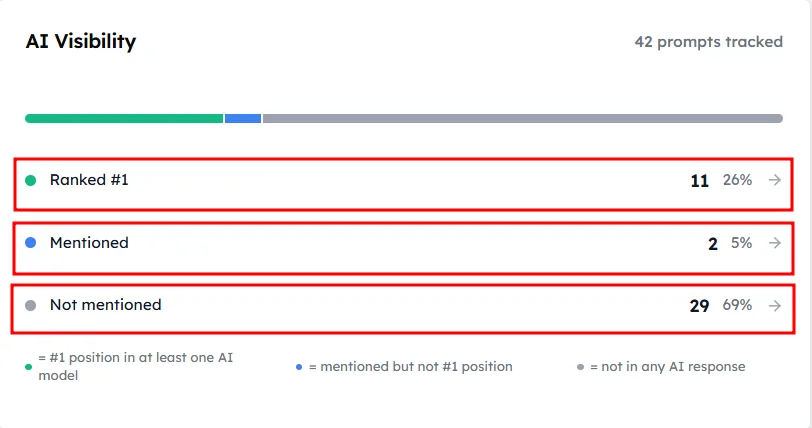
- AI Visibility card: your prompts grouped into Ranked First, Mentioned and Not Mentioned.
- Prompts: position for each prompt and each AI model.
- Performance and Top Rankings: position compared with your competitors.
How to use position to find quick wins#
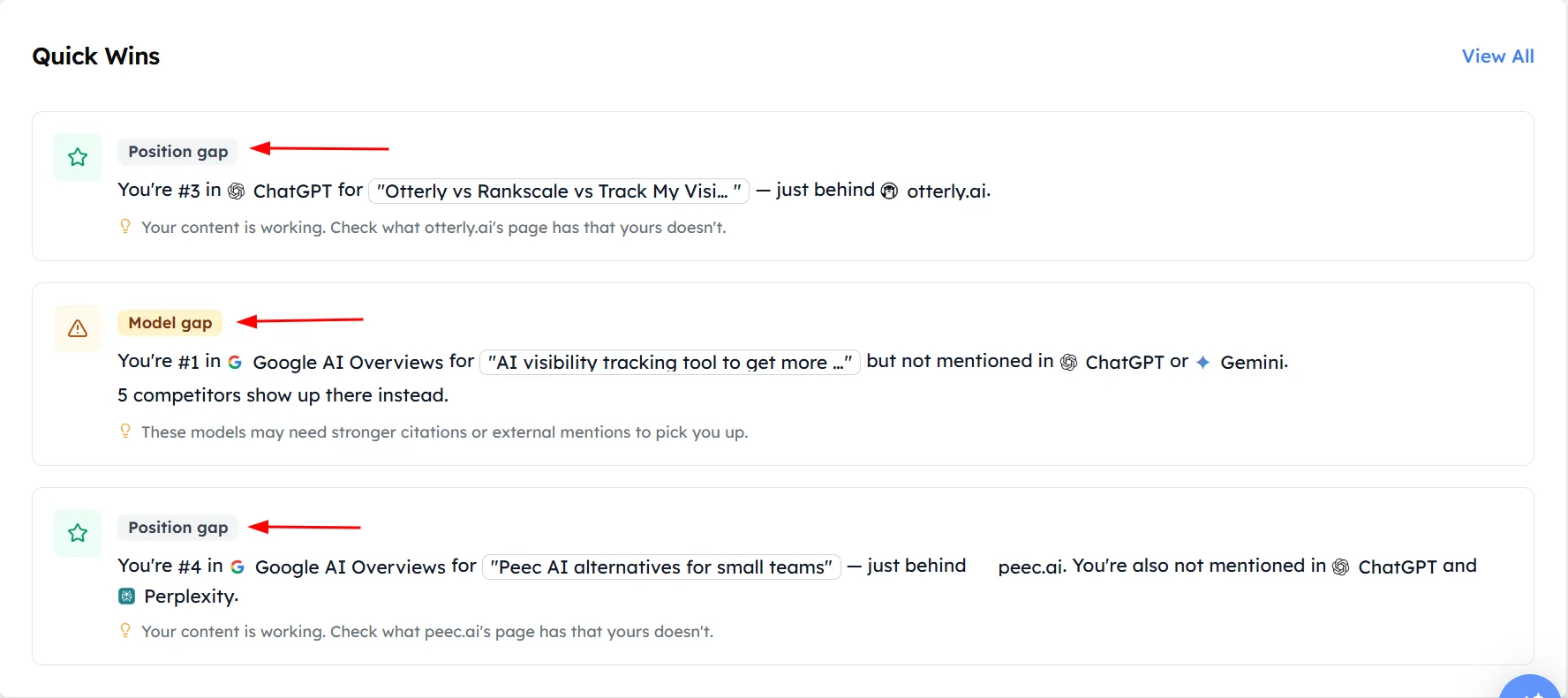
Prompts where your brand is mentioned but not first are often the easiest to improve, because AI models already connect your brand with the question.
The Quick Wins card on the Overview lists these prompts. For example, your brand might be second on Gemini and missing on Perplexity for the same prompt.
What moves your position#
AI models tend to name brands first when the sources they read point to those brands clearly. Your position usually improves when:
- Comparison and "best of" articles list your brand near the top.
- Reviews and ratings for your brand are strong and recent.
- Your own pages state clearly what your product does and who it's for.
- Your brand is described consistently across the websites AI models cite.
Frequently asked questions#
What is average position in AI answers?
Average position is the average place your brand holds among the brands named in AI answers, counted only in answers that mention your brand. A position of 1.0 means AI models named your brand first every time.
Is a lower or higher position better?
A lower position is better. Position 1 means your brand was the first brand named in the answer, and position 3 means two other brands were named before yours.
Why do I see a dash instead of a position?
You see a dash when no AI answer in the selected date range mentions your brand for that prompt or AI model. Position is only calculated for answers that mention your brand.
Why is my position different on each AI model?
Each AI model reads different sources and decides for itself which brands to recommend first. Compare your position by AI model on the Overview to find the model where competitors are named before you.
How do I get AI models to recommend my brand first?
You get AI models to recommend your brand first by appearing near the top of the comparison articles, reviews and roundups they cite, and by publishing clear pages that explain why your brand fits the question. Start with the prompts on the Quick Wins card, where your brand is already mentioned but not first.
Related articles
Last updated 3 Nov 2026
Can't find what you need?
Email support@trackmyvisibility.com with your website, what you were trying to do and what you saw. A screenshot helps.