
Sentiment
On this page
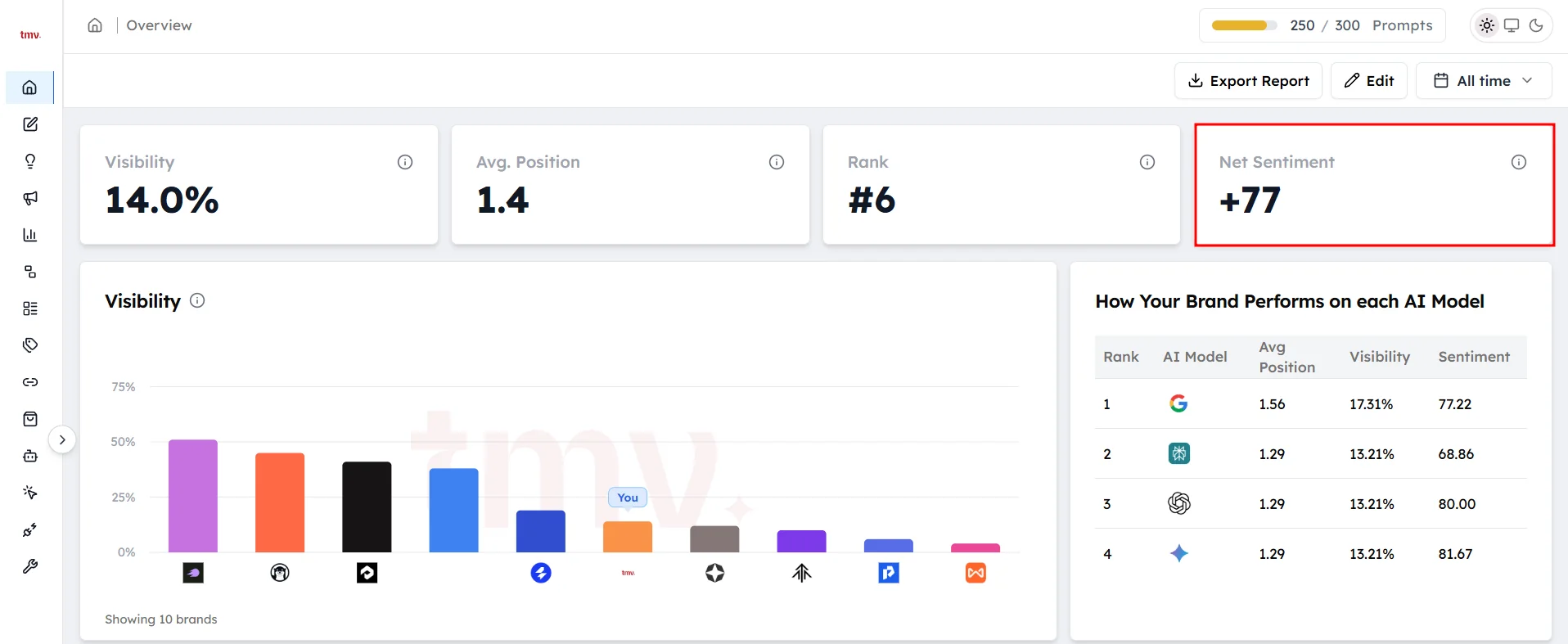
Sentiment shows how positively AI models describe your brand when they mention it. In the Track My Visibility application, sentiment is scored for every AI answer that names your brand, and the scores are combined into your Net Sentiment.
Being mentioned isn't enough. If an AI model describes your brand as expensive, outdated or hard to use, that mention can hurt more than it helps. Sentiment shows how AI models describe your brand, which visibility alone doesn't tell you.
How sentiment is scored#
Each time an AI model mentions your brand, Track My Visibility scores how the answer describes you. Scores go from 0 to 100, and a higher score means a more positive description.
Your sentiment is the average of these scores. The Overview shows it as Net Sentiment.
What affects your sentiment#
AI models build their descriptions from the sources they read. Your sentiment is usually shaped by:
- Reviews: ratings and complaints on review sites and marketplaces.
- Comparisons: roundups and "best of" articles that list your strengths and weaknesses next to competitors.
- Forums and communities: threads where users discuss problems, pricing or support.
- Your own content: product pages, documentation and FAQs that explain what your brand does.
- Outdated information: old articles that describe features, pricing or issues that no longer apply.
Where to find sentiment#
Sentiment appears in several places in the Track My Visibility application:
- Overview: your Net Sentiment, split by AI model.
- Prompts: sentiment for each prompt.
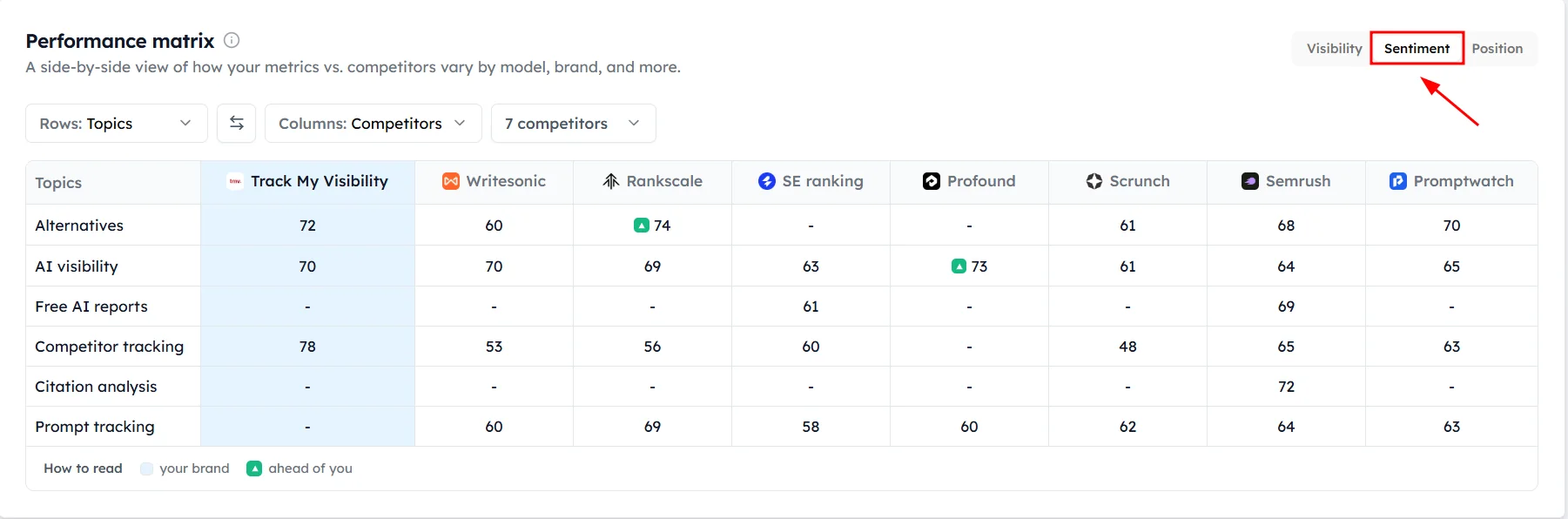
- Performance: sentiment for every brand by topic or AI model.
- Top Rankings: which brand is described most positively in each topic.
How to find out why sentiment is low#
Step 1. Open the prompt#
Go to Prompts and open a prompt with a low sentiment score.
Step 2. Read the answer#
Choose an AI model and read how it describes your brand. Look for complaints, old information or weak comparisons with competitors.
Step 3. Check the sources#
Look at the sources the AI model cited. A low score often comes from one or two pages, such as an old review or a forum thread.
Step 4. Fix the source#
Respond to the source, publish a page that answers the concern, or get your brand mentioned on websites AI models trust. Authority and trust signals lists the websites worth targeting.
Step 5. Track the change#
Check the prompt again after a few weeks. AI models need to read the updated or new sources before their answers change.
Frequently asked questions#
What is brand sentiment in AI search?
Brand sentiment in AI search is how positively or negatively AI models such as ChatGPT, Perplexity, Gemini and Google AI Overviews describe your brand in their answers. Track My Visibility scores it from 0 to 100 for every answer that mentions your brand.
What is Net Sentiment in Track My Visibility?
Net Sentiment is the average sentiment score across all AI answers that mention your brand in the selected date range. It appears on the Overview dashboard and is split by AI model.
Why do AI models describe my brand negatively?
AI models usually describe a brand negatively because the sources they cite contain complaints, poor reviews or outdated information. Open the prompt, read the answer and check the cited sources to find the page behind the negative description.
Why is my sentiment different on each AI model?
Each AI model reads and cites different sources, so each model can describe your brand differently. A model that cites review sites may reflect your ratings, while a model that cites your own pages may describe you more positively.
How do I improve how AI models describe my brand?
You improve how AI models describe your brand by fixing or answering the sources behind negative descriptions, publishing clear pages about your product and pricing, and earning positive mentions on websites AI models trust. Changes take time to show, because AI models need to read the new or updated sources first.
Related articles
Last updated 3 Nov 2026
Can't find what you need?
Email support@trackmyvisibility.com with your website, what you were trying to do and what you saw. A screenshot helps.